Home

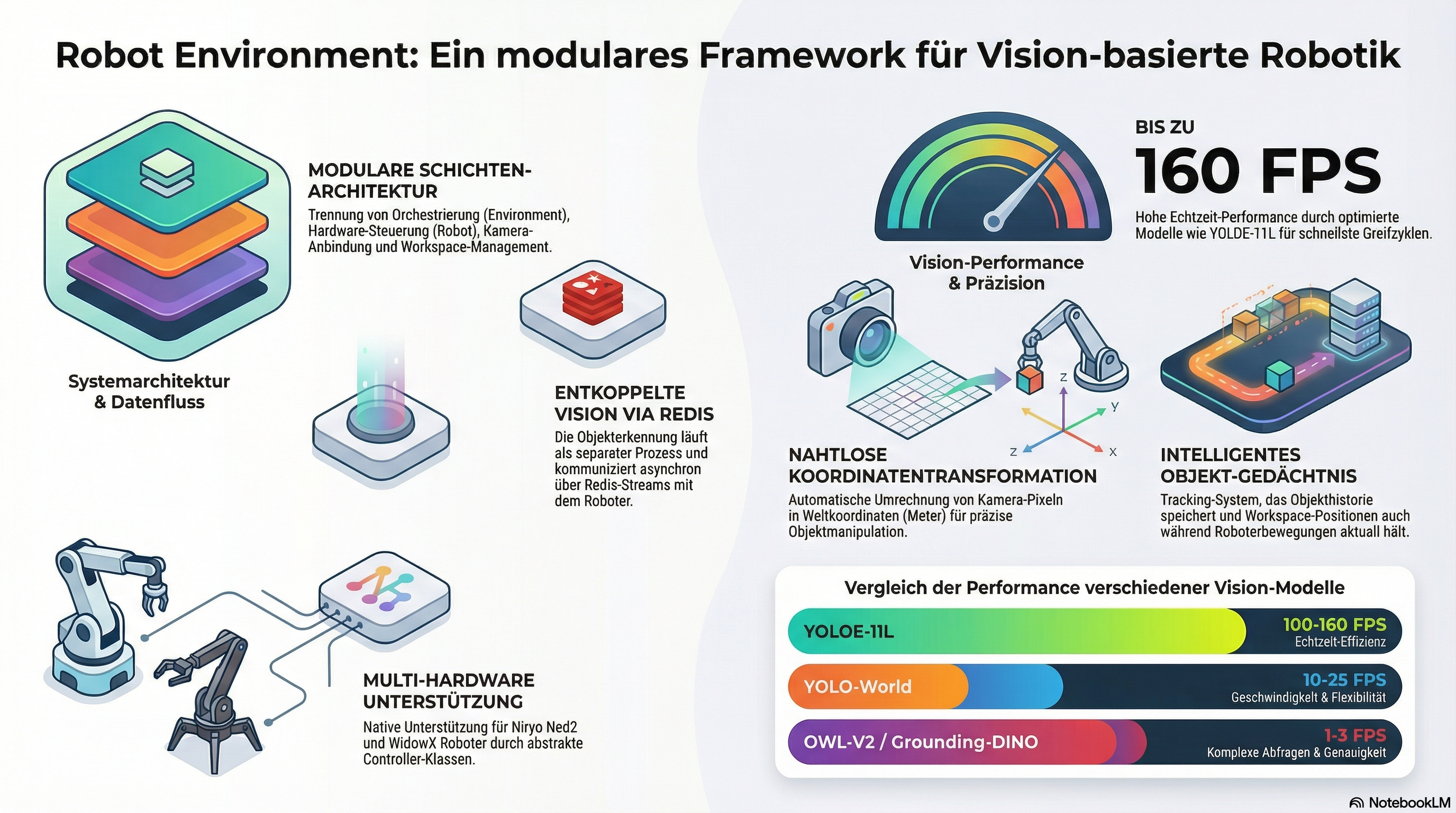
A comprehensive Python framework for robotic pick-and-place operations with vision-based object detection and manipulation capabilities


Overview
The Robot Environment is a modular Python framework that automates the control of robotic arms for precise pick-and-place tasks. By integrating AI-based object detection and advanced workspace management, robots such as the Niryo Ned2 or WidowX can independently identify and manipulate objects. A key feature is the decoupled architecture, in which image processing and robot control communicate efficiently with each other via Redis interfaces. The system also supports real-time data streaming, thread safety for simultaneous processes, and natural interaction through text-to-speech functions. Thanks to its support for simulations and physical hardware, the software provides a flexible basis for complex robotic applications.
Key Features
- 🤖 Multi-Robot Support - Modular architecture supporting Niryo Ned2 and WidowX robotic arms
- 👁️ Vision-Based Object Detection - Integration with multiple detection models, using vision_detect_segment
- 🗺️ Workspace Management - Flexible workspace definition with camera-to-world coordinate transformation, using robot_workspace
- 📡 Redis Communication - Efficient image streaming and object data sharing via Redis, using redis_robot_comm
- 🔊 Text-to-Speech - Natural language feedback using text2speech
- 🧵 Thread-Safe Operations - Concurrent camera updates and robot control with proper locking
- 🎮 Simulation Support - Compatible with both real robots and Gazebo simulation
- 💾 Object Memory Management - Intelligent tracking of detected objects with workspace-aware updates
Architecture
System Overview
┌─────────────────────────────────────────────────────────────┐
│                    Environment Layer                        │
│  (Central orchestrator coordinating all subsystems)         │
└─────────────────────────────────────────────────────────────┘
                            │
        ┌───────────────────┼───────────────────┐
        │                   │                   │
┌───────▼────────┐   ┌──────▼──────┐   ┌────────▼─────────┐
│  Robot Control │   │   Vision    │   │    Workspace     │
│     Layer      │   │    Layer    │   │      Layer       │
└────────────────┘   └─────────────┘   └──────────────────┘
        │                   │                   │
┌───────▼────────┐   ┌──────▼──────┐   ┌────────▼─────────┐
│ RobotController│   │FrameGrabber │   │    Workspace     │
│   (Abstract)   │   │  (Abstract) │   │   (Abstract)     │
└────────────────┘   └─────────────┘   └──────────────────┘
        │                   │                   │
┌───────▼────────┐   ┌──────▼──────┐   ┌────────▼─────────┐
│ NiryoRobot     │   │ NiryoFrame  │   │ NiryoWorkspace   │
│  Controller    │   │   Grabber   │   │                  │
└────────────────┘   └─────────────┘   └──────────────────┘
                            │
                    ┌───────▼───────┐
                    │ Redis Streams │
                    │  (Images +    │
                    │   Objects)    │
                    └───────────────┘
Core Components
Environment Layer
- Environment - Central orchestrator managing all subsystems
- Coordinates camera updates and robot control
- Manages object memory with workspace-aware tracking
- Handles thread-safe operations with proper locking
Robot Control Layer
- Robot - High-level robot API implementing pick-and-place operations
- RobotController - Abstract base class for hardware control
- NiryoRobotController - Niryo Ned2 implementation with pyniryo
- WidowXRobotController - WidowX implementation with InterbotixManipulatorXS
Vision Layer
- FrameGrabber - Abstract camera interface with Redis streaming
- NiryoFrameGrabber - Niryo-mounted camera with undistortion
- WidowXFrameGrabber - Intel RealSense integration (stub)
Workspace Layer
- Workspace - Abstract workspace with coordinate transformation
- NiryoWorkspace - Niryo-specific workspace implementation
- Workspaces - Collection managing multiple workspaces
Communication Layer
- RedisImageStreamer - Variable-size image streaming (from redis_robot_comm)
- RedisMessageBroker - Object detection results publishing
- RedisLabelManager - Dynamic object label configuration
For detailed architecture documentation, see architecture.md
Installation
Prerequisites
- Python ≥ 3.9
- Redis Server ≥ 5.0
- Robot-specific drivers:
- Niryo:
pyniryoorpyniryo2 - WidowX:
interbotix-xs-modules
Basic Installation
Dependencies
Core dependencies are automatically installed:
pip install numpy opencv-python redis torch torchaudio
pip install vision-detect-segment redis-robot-comm robot-workspace text2speech
Robot-specific dependencies:
Redis Server
# Using Docker (recommended)
docker run -p 6379:6379 redis:alpine

# Or install locally
# Ubuntu/Debian:
sudo apt-get install redis-server

# macOS:
brew install redis
Quick Start
Basic Pick and Place
from robot_environment.environment import Environment
from robot_workspace import Location
import threading
import time

# Initialize environment
env = Environment(
    el_api_key="your_elevenlabs_key",  # For text-to-speech
    use_simulation=False,               # Set True for Gazebo
    robot_id="niryo",                   # or "widowx"
    verbose=True,
    start_camera_thread=True            # Auto-start camera updates
)

# Alternative: Manual camera thread control
def start_camera_updates(environment, visualize=False):
    def loop():
        for img in environment.update_camera_and_objects(visualize=visualize):
            pass
    t = threading.Thread(target=loop, daemon=True)
    t.start()
    return t

# Move to observation pose
env.robot_move2observation_pose(env.get_workspace_home_id())

# Wait for object detection
time.sleep(2)

# Get detected objects
detected_objects = env.get_detected_objects_from_memory()
print(f"Detected {len(detected_objects)} objects:")
for obj in detected_objects:
    print(f"  - {obj.label()} at [{obj.x_com():.2f}, {obj.y_com():.2f}]")

# Pick and place an object
robot = env.robot()
success = robot.pick_place_object(
    object_name="pencil",
    pick_coordinate=[-0.1, 0.01],
    place_coordinate=[0.1, 0.11],
    location=Location.RIGHT_NEXT_TO
)

if success:
    print("✓ Object successfully picked and placed")
else:
    print("✗ Pick and place operation failed")

# Cleanup
env.cleanup()
Multi-Workspace Operations
from robot_environment.environment import Environment
from robot_workspace import Location

env = Environment("key", False, "niryo", verbose=True)

# Get workspace IDs
left_ws_id = env.workspaces().get_workspace_left_id()
right_ws_id = env.workspaces().get_workspace_right_id()

# Observe left workspace
env.robot_move2observation_pose(left_ws_id)
env.set_current_workspace(left_ws_id)
time.sleep(2)

# Get objects from left workspace
left_objects = env.get_detected_objects_from_workspace(left_ws_id)
print(f"Left workspace: {len(left_objects)} objects")

# Transfer object to right workspace
if len(left_objects) > 0:
    obj = left_objects[0]
    robot.pick_place_object_across_workspaces(
        object_name=obj.label(),
        pick_workspace_id=left_ws_id,
        pick_coordinate=[obj.x_com(), obj.y_com()],
        place_workspace_id=right_ws_id,
        place_coordinate=[0.25, -0.05],
        location=Location.RIGHT_NEXT_TO
    )
For complete multi-workspace examples, see examples/multi_workspace_example.py
Advanced Features
Object Detection and Filtering
from robot_workspace import Location

# Get objects from memory (persists during robot motion)
detected_objects = env.get_detected_objects_from_memory()

# Spatial filtering
objects_left = detected_objects.get_detected_objects(
    location=Location.LEFT_NEXT_TO,
    coordinate=[0.2, 0.0],
    label="cube"
)

# Find nearest object
nearest, distance = detected_objects.get_nearest_detected_object(
    coordinate=[0.25, 0.05],
    label="pencil"
)

# Size-based queries
largest, size = detected_objects.get_largest_detected_object()
smallest, size = detected_objects.get_smallest_detected_object()

# Sort by size
sorted_objects = detected_objects.get_detected_objects_sorted(ascending=True)
Workspace Coordinate System
# Get workspace corners
workspace = env.get_workspace(0)
upper_left = workspace.xy_ul_wc()
lower_right = workspace.xy_lr_wc()
center = workspace.xy_center_wc()

# Transform camera coordinates to world coordinates
pose = workspace.transform_camera2world_coords(
    workspace_id="niryo_ws",
    u_rel=0.5,  # Center of image (normalized [0,1])
    v_rel=0.5,
    yaw=0.0
)

# Get workspace dimensions
width = workspace.width_m()
height = workspace.height_m()
print(f"Workspace: {width:.3f}m × {height:.3f}m")
Object Memory Management
# Memory is automatically updated when at observation pose
# Manual memory operations:

# Clear all memory
env.clear_memory()

# Remove specific object after manipulation
env.remove_object_from_memory("pencil", [0.25, 0.05])

# Update object position after placement
env.update_object_in_memory(
    object_label="cube",
    old_coordinate=[0.2, 0.0],
    new_pose=new_pose_object
)

# Get memory contents
memory_objects = env.get_detected_objects_from_memory()
Finding Free Space
# Find largest free area in workspace
largest_area_m2, center_x, center_y = env.get_largest_free_space_with_center()

print(f"Free space: {largest_area_m2*10000:.2f} cm²")
print(f"Center: [{center_x:.2f}, {center_y:.2f}]")

# Place object at center of free space
robot.pick_place_object(
    object_name="box",
    pick_coordinate=[0.2, 0.0],
    place_coordinate=[center_x, center_y],
    location=Location.NONE
)
Pushing Objects
# For objects too large to grip
success = robot.push_object(
    object_name="large_box",
    push_coordinate=[0.3, 0.1],
    direction="left",    # "up", "down", "left", "right"
    distance=50.0        # millimeters
)
Custom Object Labels
# Add new detectable object
message = env.add_object_name2object_labels("custom_tool")
print(message)  # "Added custom_tool to recognizable objects"

# Get current labels
labels = env.get_object_labels_as_string()
print(labels)  # "I can recognize these objects: pencil, pen, custom_tool, ..."
Text-to-Speech Feedback
# Asynchronous speech (non-blocking)
thread = env.oralcom_call_text2speech_async(
    "I have detected a pencil at position 0.25, 0.05"
)
# Continue with other operations
robot.pick_object("pencil", [0.25, 0.05])
thread.join()  # Wait for speech to complete
Configuration
Robot Selection
# Niryo Ned2 (real robot)
env = Environment(
    el_api_key="key",
    use_simulation=False,
    robot_id="niryo"
)

# Niryo in Gazebo simulation
env = Environment(
    el_api_key="key",
    use_simulation=True,
    robot_id="niryo"
)

# WidowX robot
env = Environment(
    el_api_key="key",
    use_simulation=False,
    robot_id="widowx"
)
Adding Custom Workspaces
Edit niryo_workspace.py:
def _set_observation_pose(self) -> None:
    if self._id == "my_custom_workspace":
        self._observation_pose = PoseObjectPNP(
            x=0.20, y=0.0, z=0.35,
            roll=0.0, pitch=math.pi/2, yaw=0.0
        )
    # ... existing workspaces
Vision Configuration
The vision system uses vision_detect_segment with configurable models:
# Models are configured in environment.py
# Default: OWL-V2 for open-vocabulary detection
# Available: "owlv2", "yolo-world", "yoloe-11l", "grounding_dino"

# To change model, modify in environment.py:
self._visual_cortex = VisualCortex(
    objdetect_model_id="yoloe-11l",  # Fast with built-in segmentation
    device="auto",
    verbose=verbose,
    config=config
)
API Reference
See api.md.
Performance Considerations
Detection Speed
| Model | Detection | Segmentation | Total FPS | Best For |
|---|---|---|---|---|
| YOLOE-11L | 6-10ms | Built-in | 100-160 FPS | Real-time unified tasks |
| YOLO-World | 20-50ms | 50-100ms (FastSAM) | 10-25 FPS | Speed-critical |
| OWL-V2 | 100-200ms | 200-500ms (SAM2) | 1-3 FPS | Custom classes |
| Grounding-DINO | 200-400ms | 200-500ms (SAM2) | 1-2 FPS | Complex queries |
Optimization Tips
# 1. Use faster detection model
config = get_default_config("yoloe-11s")  # Fast variant

# 2. Reduce object labels
config.set_object_labels(["cube", "cylinder"])  # Only what you need

# 3. Disable segmentation if not needed
config.enable_segmentation = False

# 4. Adjust camera update rate
time.sleep(0.5)  # Between camera updates

# 5. Use GPU acceleration
cortex = VisualCortex("yoloe-11l", device="cuda")
Memory Management
- Object memory stores detection history during robot motion
- Memory automatically updated when at observation pose
- Old detections removed when workspace visibility changes
- Manual updates from pick/place operations persist briefly
Testing
See TESTING.md
Troubleshooting
Common Issues
No Objects Detected
# Check Redis connection
from redis_robot_comm import RedisMessageBroker
broker = RedisMessageBroker()
if broker.test_connection():
    print("✓ Redis connected")
Objects at Wrong Positions
# Check workspace calibration
workspace = env.get_workspace_by_id("niryo_ws")
print(f"Corners: UL={workspace.xy_ul_wc()}, LR={workspace.xy_lr_wc()}")

# Ensure workspace is level and stable
# Verify camera is properly mounted

# Get fresh detection before picking
env.robot_move2observation_pose(workspace_id)
time.sleep(2)  # Wait for detection
objects = env.get_detected_objects_from_memory()
Robot Won't Move
# Check connection
robot_ctrl = env.get_robot_controller()
pose = robot_ctrl.get_pose()
print(f"Current pose: {pose}")

# Verify calibration (Niryo)
robot_ctrl.calibrate()

# Check coordinates are reachable
workspace = env.get_workspace(0)
print(f"Valid range: X=[{workspace.xy_lr_wc().x}, {workspace.xy_ul_wc().x}]")
print(f"             Y=[{workspace.xy_lr_wc().y}, {workspace.xy_ul_wc().y}]")
Memory Issues
# Clear stale memory
env.clear_memory()

# Force fresh detection
env.robot_move2observation_pose(workspace_id)
time.sleep(2)

# Check memory contents
memory = env.get_detected_objects_from_memory()
print(f"Objects in memory: {len(memory)}")
For comprehensive troubleshooting, see troubleshooting.md.
Examples
Complete Examples
- main.py - Basic pick and place demonstration
- examples/multi_workspace_example.py - Multi-workspace operations
Run Examples
# Start Redis server
docker run -p 6379:6379 redis:alpine

# Run basic example
python main.py

# Run multi-workspace examples
cd examples
python multi_workspace_example.py
Documentation
- Architecture Documentation - Detailed system architecture
- API Reference - Complete API documentation
- Multi-Workspace Guide - Multi-workspace operations
- Troubleshooting - Common issues and solutions
- Testing Guide - Testing documentation
Development
Code Quality
# Install development dependencies
pip install -r requirements-dev.txt

# Linting with Ruff
ruff check . --fix

# Formatting with Black
black .

# Type checking with mypy
mypy robot_environment --ignore-missing-imports

# Security scanning with Bandit
bandit -r robot_environment/ -ll
Pre-Commit Hooks
CI/CD
The project includes comprehensive GitHub Actions workflows:
- Tests - Multi-platform testing (Ubuntu, Windows, macOS) across Python 3.9-3.11
- Code Quality - Ruff, Black, mypy checks
- Security - CodeQL and Bandit security scanning
- Dependency Review - Automated security audits
- Release - Automated package building on tags
Contributing
See contributing.md for details.
Related Projects
This package integrates with several companion projects:
- vision_detect_segment - Object detection and segmentation
- redis_robot_comm - Redis-based communication
- robot_workspace - Workspace management and object representation
- text2speech - Natural language feedback
- robot_mcp - LLM-based robot control using Model Context Protocol
License
This project is licensed under the MIT License. See LICENSE for details.
Citation
If you use this package in your research, please cite:
@software{robot_environment,
  author = {Gaida, Daniel},
  title = {robot_environment: Vision-Based Robotic Manipulation Framework},
  year = {2025},
  url = {https://github.com/dgaida/robot_environment}
}
Acknowledgments
This package builds upon:
- pyniryo - Niryo robot control
- InterbotixManipulatorXS - WidowX robot control
- Supervision - Annotation framework
- Transformers - Vision models
- Ultralytics - YOLO models
- Redis - High-performance messaging
Support
- GitHub Issues: https://github.com/dgaida/robot_environment/issues
- Documentation: architecture.md
- Examples: examples/
Author
Daniel Gaida Email: daniel.gaida@th-koeln.de GitHub: @dgaida
Project Link: https://github.com/dgaida/robot_environment
Roadmap
Planned Features
- [ ] Additional robot support (UR5, Franka Emika)
- [ ] Improved collision detection and avoidance
- [ ] Force/torque sensor integration
- [ ] Advanced grasp planning
- [ ] Multi-robot coordination
- [ ] Web-based control interface
- [ ] ROS2 integration
- [ ] Improved simulation support
Recent Additions
- ✅ Multi-workspace support
- ✅ YOLOE model support with built-in segmentation
- ✅ Enhanced object memory management
- ✅ Workspace visibility tracking
Last Updated: December 2025